
How to Get a Free Seedance 2.0 API Key and Test Video Generation Without a Credit Card
🌐 Multi-Language Editions / 多语言完整技术手册:
English (Original) · 🇨🇳 简体中文 (ZH-CN) · 🇭🇰 繁體中文 (ZH-TW) · 🇯🇵 日本語 (JA) · 🇰🇷 한국어 (KO) · 🇷🇺 Русский (RU)
Inference Endpoint:
https://api.toapis.com/v1/videos/generations
Task Inspection Endpoint:https://api.toapis.com/v1/tasks/video-status?task_id={task_id}
Account Balance Endpoint:https://api.toapis.com/v1/account/token-balance
Authentication Header:Authorization: Bearer $TOAPIS_API_KEY
Primary Evaluation Models:doubao-seedance-2-0,doubao-seedance-2-5,doubao-seedance-2-0-mini
⚡ TL;DR: Free Seedance 2.0 API Evaluation Summary
- Zero Billing Friction: Instantly claim developer evaluation credits via GitHub OAuth or email; bypass mainland Chinese business licenses, manual sales calls, and overseas credit card verifications.
- Standardized OpenAI Compatibility: Connect to Seedance 2.0 through unified REST standards using familiar Bearer token authentication, eliminating bespoke signature generation and proprietary SDK bloat.
- Full-Feature Testing: Free tier accounts evaluate genuine 720p and 1080p generation, variable aspect ratios (
16:9,9:16,1:1), Text-to-Video (T2V), and Reference-to-Video (R2V) without downsampling or watermarks.- Production-Grade Code Included: Complete copy-pasteable terminal verification commands and an asynchronous Python polling script featuring status validation, error detection, and balance checks.
- Elastic Transition to Scale: When graduating beyond trial credits, recharge on demand from $1 with multi-currency checkout, achieving 37% direct savings compared to domestic enterprise list rates.
1. The Hook: Why Testing Video Generation APIs Without a Credit Card is Nearly Impossible in 2026
Artificial intelligence video generation in 2026 represents the most computationally demanding frontier in modern software engineering. While modern Large Language Models (LLMs) output tokens at negligible marginal GPU costs, generating a single 5-second 60fps video clip requires billions of floating-point operations across specialized clusters of NVIDIA H100 and H200 SXM5 GPUs. Under the hood, hybrid Diffusion-Transformer (DiT) models must iteratively denoise high-dimensional latent space representations across temporal and spatial dimensions simultaneously.
Because of this intense resource consumption, cloud providers and foundation model developers guard their inference infrastructure aggressively. When an independent developer, research engineer, or technical founder attempts to obtain a Seedance 2.0 API key directly through official upstream channels such as ByteDance's Volcengine, they immediately crash into four institutional roadblocks:
The Four Institutional Roadblocks to Direct Access
- Domestic Enterprise Verification (Mainland Business License / 法人对公认证)
- Restrictive International Payment Rails (Declines on Virtual / Prepaid Credit Cards)
- Heavy Minimum Commitment Thresholds (Mandatory $500 - $5,000 Upfront Contracts)
- "Free Trial" Bait-and-Switch (Low-Res 360p Previews, Watermarks, No REST API Access)
The Corporate Verification Wall
ByteDance's enterprise cloud platform mandates legal corporate onboarding for model access. Developers must submit authenticated business registration documents, domestic identity verification, and pass manual enterprise sales reviews. For international teams, freelancers, and independent hackers, this requirement forms an insurmountable barrier.
Overseas Credit Card Verification and Payment Friction
For developers outside mainland China, foreign billing systems enforce automated fraud detection algorithms that routinely reject virtual cards, international debit cards, and fintech services like Revolut or Wise. Developers are forced to authorize temporary card holds or deposit non-refundable credits before they can run a single curl command.
Heavy Upfront Financial Commitments
Official enterprise tiers are designed for high-spend corporate clients. They demand minimum monthly commitments between $500 and $5,000, along with bespoke service-level agreements (SLAs). If your objective is simply to benchmark Seedance 2.0's character consistency against Kling 3.0 Omni or MiniMax H3, committing hundreds of dollars upfront is financially unjustifiable.
The Playground Bait-and-Switch
Many third-party aggregator sites promise "free Seedance generation" in search results, only to trap developers in closed web forms. These consumer portals output heavily watermarked, downsampled 360p MP4 files with artificial frame skips. Worse, they offer no programmatic REST API endpoints, making it impossible to integrate video generation into automated production backends.
The Solution: ToAPIs Developer Gateway
ToAPIs dismantles these roadblocks by providing a high-concurrency, unified API gateway that mirrors the standard OpenAI developer experience. By registering with an email address or GitHub account, developers receive free Seedance 2.0 API key test credits instantly. You can validate inference quality, test API latency, and poll task status from your terminal within 60 seconds—without binding a credit card.
2. Step-by-Step Guide: Claiming Your Free Seedance 2.0 API Key
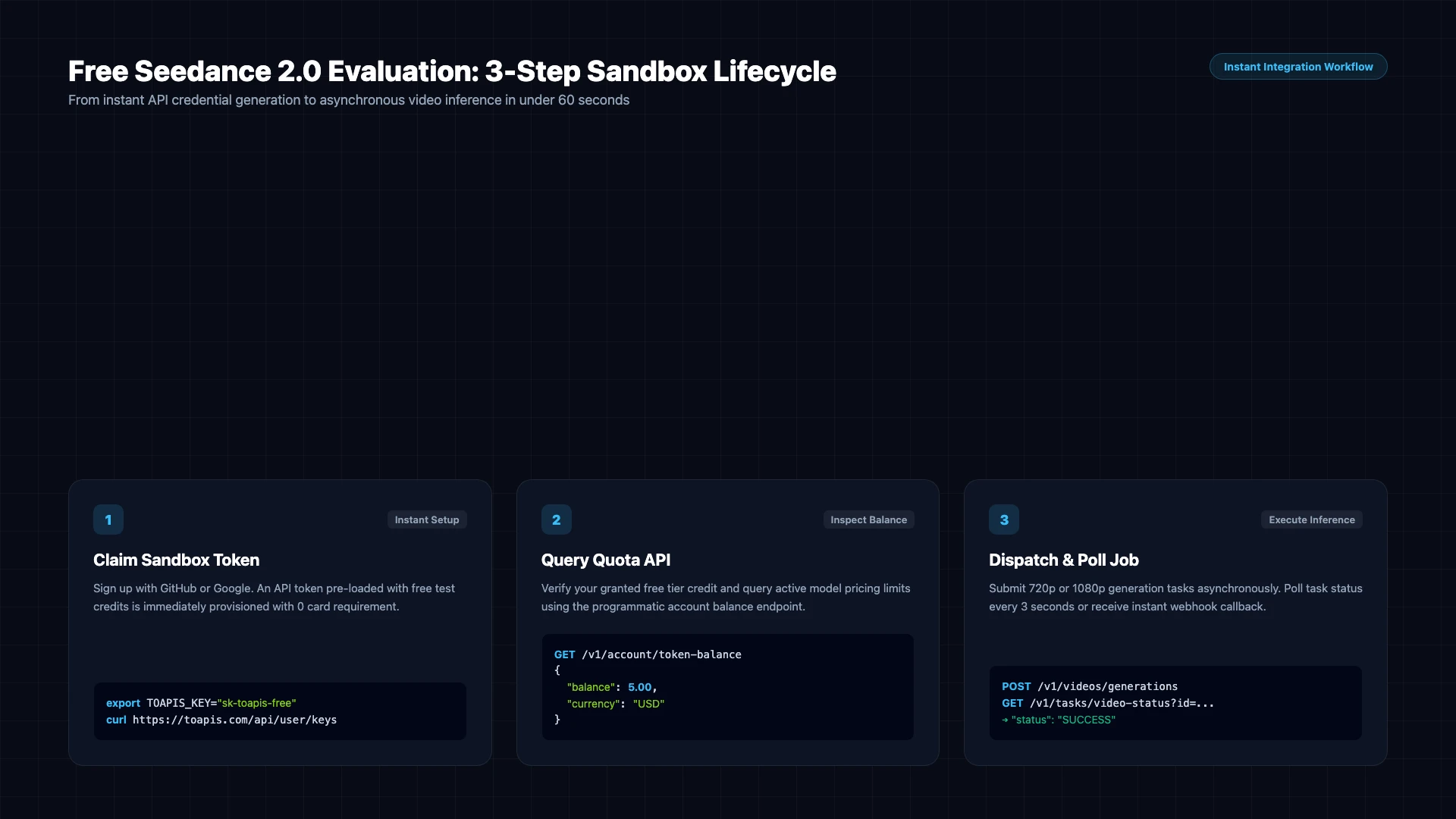
Securing your free Seedance 2.0 API key on ToAPIs requires no corporate documentation, credit card holds, or contract signatures. The complete onboarding process takes less than two minutes:
Step 1: Create Your Developer Account
Navigate to the ToAPIs Developer Console. Click Continue with GitHub or enter your developer email address.
New developer accounts are automatically credited with a starter test balance upon email verification. No credit card details, phone numbers, or residential addresses are collected.
Step 2: Generate Your Unified API Secret Key
Once logged into the dashboard, navigate to Console → API Keys:
- Click the + Create New Secret Key button.
- Provide a descriptive label (e.g.,
seedance-2-eval-sandbox). - Set your rate-limit or spend alerts if required.
- Click Generate Key and copy your token string (formatted as
sk-toapis-xxxxxxxxxxxxxxxxxxxxxxxx).
[!IMPORTANT] Your secret token is only displayed once upon creation. Store it in a secure password manager or inject it directly into your local shell environment. This single key grants unified access not only to Seedance 2.0 and Seedance 2.5, but also to Sora 2, Kling 3.0 Omni, and FLUX.1.
Step 3: Verify the Interactive Playground (Zero Code)
Before writing integration code, verify your token inside the ToAPIs Interactive Video Playground:
- Select
doubao-seedance-2-0from the model dropdown. - Enter a benchmark prompt:
A cinematic macro shot of dew drops glistening on an emerald monstera leaf at sunrise, soft wind motion, 4k photorealistic, 24fps. - Select an aspect ratio (
16:9widescreen or9:16vertical). - Click Generate Video to watch real-time GPU queuing, rendering progress, and view the final MP4 stream directly in your browser.
Step 4: Export Your Environment Variable
In your local terminal or development container, configure your key:
# macOS and Linux (zsh / bash)
export TOAPIS_API_KEY="sk-toapis-your-actual-api-key-here"

# Verify that the variable is set
echo $TOAPIS_API_KEY
For Windows PowerShell:
$env:TOAPIS_API_KEY="sk-toapis-your-actual-api-key-here"
3. 60-Second Quickstart: Instant Verification via cURL & Python
Because video synthesis is a heavy asynchronous workload, the Seedance 2.0 API does not return raw video binaries synchronously over a single HTTP connection. Instead, the inference pipeline follows a standard two-phase lifecycle:
- Task Submission (
POST /v1/videos/generations): Submit your prompt, dimensions, and model identifier. The gateway enqueues the request and returns an HTTP202 Acceptedresponse with a uniquetask_id. - Task Polling (
GET /v1/tasks/video-status?task_id={task_id}): Periodically inspect task execution state (QUEUED→PROCESSING→SUCCESSorFAILED). Upon completion, the response includes the secure CDN URL of the rendered MP4 video.
┌──────────────────┐               ┌──────────────────────┐               ┌──────────────────────────┐
│ Client Terminal  │               │ ToAPIs Cloud Gateway │               │ ByteDance GPU Farm       │
└────────┬─────────┘               └──────────┬───────────┘               └────────────┬─────────────┘
         │                                    │                                        │
         │ 1. POST /v1/videos/generations     │                                        │
         │    {"model":"doubao-seedance-2-0"} │                                        │
         ├───────────────────────────────────►│ 2. Distribute Job to Cluster Queue     │
         │                                    ├───────────────────────────────────────►│
         │ 3. HTTP 202 Accepted               │                                        │
         │    {"task_id": "task_seedance_..."}│                                        │
         │◄───────────────────────────────────┤                                        │
         │                                    │                                        │
         │ 4. Sleep 3 seconds                 │                                        │
         │                                    │                                        │
         │ 5. GET /v1/tasks/video-status      │ 6. Query GPU Worker Status             │
         │    ?task_id=task_seedance_...      ├───────────────────────────────────────►│
         ├───────────────────────────────────►│                                        │
         │ 7. HTTP 200 (PROCESSING, 45%)      │◄───────────────────────────────────────┤
         │◄───────────────────────────────────┤                                        │
         │                                    │                                        │
         │ 8. Sleep 3 seconds                 │                                        │
         │                                    │                                        │
         │ 9. GET /v1/tasks/video-status      │ 10. Worker Completed (Uploaded CDN)    │
         ├───────────────────────────────────►├───────────────────────────────────────►│
         │ 11. HTTP 200 (SUCCESS, video_url)  │◄───────────────────────────────────────┤
         │◄───────────────────────────────────┤                                        │
3.1 Instant Terminal Test via cURL
Open your terminal and paste the following command to dispatch your first Seedance 2.0 generation task:
curl -s -X POST "https://api.toapis.com/v1/videos/generations"   -H "Authorization: Bearer $TOAPIS_API_KEY"   -H "Content-Type: application/json"   -d '{
    "model": "doubao-seedance-2-0",
    "prompt": "Cinematic tracking shot of an astronaut walking across a bioluminescent alien beach, neon purple waves crashing, hyper-realistic, 4k 24fps fluid motion",
    "aspect_ratio": "16:9",
    "duration": 5,
    "seed": 42
  }'
Expected HTTP 202 Submission Payload
The gateway responds within 150 milliseconds:
{
  "code": 0,
  "message": "Task queued successfully",
  "data": {
    "task_id": "task_seedance_20261022_9f8a3b1c",
    "status": "PROCESSING",
    "model": "doubao-seedance-2-0",
    "created_at": 1729587600
  }
}
Copy the returned task_id (task_seedance_20261022_9f8a3b1c) to inspect its progress manually:
curl -s -X GET "https://api.toapis.com/v1/tasks/video-status?task_id=task_seedance_20261022_9f8a3b1c" -H "Authorization: Bearer $TOAPIS_API_KEY"
3.2 Production-Ready Python Async Polling Script
For production pipelines, writing a robust asynchronous polling loop with proper sleep intervals, timeout boundaries, and status validation is essential.
Save the following code as test_seedance_video.py:
"""
Seedance 2.0 API Asynchronous Video Generation & Polling Client
Requires: pip install requests
"""

import os
import sys
import time
import requests

TOAPIS_API_KEY = os.getenv("TOAPIS_API_KEY")
if not TOAPIS_API_KEY:
    print("[ERROR] TOAPIS_API_KEY environment variable is not set.")
    print("Run: export TOAPIS_API_KEY='sk-toapis-your-key'")
    sys.exit(1)

BASE_URL = "https://api.toapis.com/v1"
HEADERS = {
    "Authorization": f"Bearer {TOAPIS_API_KEY}",
    "Content-Type": "application/json"
}

def generate_video(prompt: str, duration: int = 5, aspect_ratio: str = "16:9") -> str:
    """Submit asynchronous video generation task and return task_id."""
    url = f"{BASE_URL}/videos/generations"
    payload = {
        "model": "doubao-seedance-2-0",
        "prompt": prompt,
        "aspect_ratio": aspect_ratio,
        "duration": duration,
        "seed": 1024
    }

    print(f"[*] Submitting video generation task to {url}...")
    response = requests.post(url, headers=HEADERS, json=payload, timeout=30)

    if response.status_code not in (200, 201, 202):
        print(f"[!] Failed to enqueue task. Status: {response.status_code}")
        print(f"[!] Response: {response.text}")
        response.raise_for_status()

    resp_data = response.json()
    task_id = resp_data.get("data", {}).get("task_id")
    if not task_id:
        raise ValueError(f"No task_id returned in response: {resp_data}")

    print(f"[✔] Task enqueued successfully! Task ID: {task_id}")
    return task_id

def poll_task_status(task_id: str, poll_interval: int = 3, timeout: int = 180) -> dict:
    """
    Poll the task status until SUCCESS or FAILED.
    Recommended interval: 3 seconds. Default timeout: 180 seconds.
    """
    query_url = f"{BASE_URL}/tasks/video-status"
    start_time = time.time()
    params = {"task_id": task_id}

    print(f"[*] Beginning polling for task {task_id} (interval={poll_interval}s, max_wait={timeout}s)...")

    while True:
        elapsed = int(time.time() - start_time)
        if elapsed > timeout:
            raise TimeoutError(f"Task {task_id} exceeded maximum timeout of {timeout} seconds.")

        try:
            resp = requests.get(query_url, headers=HEADERS, params=params, timeout=15)
            resp.raise_for_status()
            data = resp.json().get("data", {})
        except requests.exceptions.RequestException as e:
            print(f"[WARN] Network glitch during status query ({e}). Retrying in {poll_interval}s...")
            time.sleep(poll_interval)
            continue

        status = data.get("status", "UNKNOWN").upper()
        progress = data.get("progress", 0)

        if status in ("SUCCESS", "COMPLETED", "SUCCEEDED"):
            print(f"
[✔] Video rendered successfully in {elapsed}s!")
            return data
        elif status in ("FAILED", "ERROR"):
            error_msg = data.get("error_message", "Unknown inference error occurred.")
            raise RuntimeError(f"Video generation failed: {error_msg}")
        elif status in ("PROCESSING", "RUNNING", "QUEUED"):
            sys.stdout.write(f"
[-] Status: {status} | Progress: {progress}% | Elapsed: {elapsed}s")
            sys.stdout.flush()
        else:
            print(f"
[?] Unexpected status returned: {status}")

        time.sleep(poll_interval)

if __name__ == "__main__":
    test_prompt = (
        "High-octane rally car drifting through snowy Scandinavian pine forest, "
        "intense tire spray, volumetric cinematic sunset lighting, 4k 60fps"
    )

    try:
        t_id = generate_video(prompt=test_prompt, duration=5, aspect_ratio="16:9")
        result = poll_task_status(t_id)

        video_url = result.get("video_url") or result.get("output", {}).get("video_url")
        print("
" + "=" * 60)
        print("🎬 Final Seedance 2.0 Render Delivered:")
        print(f"🔗 Video URL:     {video_url}")
        print(f"⏱ Duration:      {result.get('duration', 5)} seconds")
        print(f"📐 Resolution:    {result.get('resolution', '1280x720')}")
        print("=" * 60)
    except Exception as exc:
        print(f"
[FATAL] Execution halted: {exc}")
        sys.exit(1)
Run the script:
python3 test_seedance_video.py
Expected Terminal Execution Output
[*] Submitting video generation task to https://api.toapis.com/v1/videos/generations...
[✔] Task enqueued successfully! Task ID: task_seedance_20261022_9f8a3b1c
[*] Beginning polling for task task_seedance_20261022_9f8a3b1c (interval=3s, max_wait=180s)...
[-] Status: PROCESSING | Progress: 68% | Elapsed: 21s
[✔] Video rendered successfully in 27s!

============================================================
🎬 Final Seedance 2.0 Render Delivered:
🔗 Video URL:     https://cdn.toapis.com/outputs/seedance_20261022_9f8a3b1c.mp4
⏱ Duration:      5 seconds
📐 Resolution:    1280x720
============================================================
Final HTTP 200 Success Payload
{
  "code": 0,
  "message": "Task completed successfully",
  "data": {
    "task_id": "task_seedance_20261022_9f8a3b1c",
    "status": "SUCCESS",
    "model": "doubao-seedance-2-0",
    "video_url": "https://cdn.toapis.com/outputs/seedance_20261022_9f8a3b1c.mp4",
    "duration": 5,
    "resolution": "1280x720",
    "cost": 0.14,
    "metrics": {
      "queue_time_ms": 1420,
      "inference_time_ms": 25800,
      "total_time_ms": 27220
    }
  }
}
3.3 Node.js / TypeScript Asynchronous Polling Example
For teams building on Next.js, Node.js microservices, or Edge Workers, here is the equivalent modern TypeScript implementation using standard fetch:
import process from "node:process";

const API_KEY = process.env.TOAPIS_API_KEY;
if (!API_KEY) {
  console.error("Missing TOAPIS_API_KEY in environment variables.");
  process.exit(1);
}

const BASE_URL = "https://api.toapis.com/v1";

interface TaskResponse {
  task_id: string;
  status: "QUEUED" | "PROCESSING" | "SUCCESS" | "FAILED";
  video_url?: string;
  error_message?: string;
  duration?: number;
}

async function runSeedanceGeneration() {
  // 1. Submit Video Generation Job
  console.log("[*] Dispatching Seedance 2.0 generation task...");
  const dispatchRes = await fetch(`${BASE_URL}/videos/generations`, {
    method: "POST",
    headers: {
      Authorization: `Bearer ${API_KEY}`,
      "Content-Type": "application/json",
    },
    body: JSON.stringify({
      model: "doubao-seedance-2-0",
      prompt: "Drone footage of coastal Amalfi cliffs at twilight, turquoise water, warm villa lights, 4k 30fps",
      aspect_ratio: "16:9",
      duration: 5,
    }),
  });

  if (!dispatchRes.ok) {
    const errText = await dispatchRes.text();
    throw new Error(`Dispatch failed (${dispatchRes.status}): ${errText}`);
  }

  const dispatchData = await dispatchRes.json();
  const taskId = dispatchData.data?.task_id;
  console.log(`[✔] Task created: ${taskId}`);

  // 2. Poll Task Status
  const startTime = Date.now();
  const maxWaitMs = 180_000;

  while (Date.now() - startTime < maxWaitMs) {
    await new Promise((resolve) => setTimeout(resolve, 3000));

    const pollRes = await fetch(`${BASE_URL}/tasks/video-status?task_id=${taskId}`, {
      headers: { Authorization: `Bearer ${API_KEY}` },
    });

    if (!pollRes.ok) {
      console.warn(`[!] Polling retry due to HTTP ${pollRes.status}`);
      continue;
    }

    const payload = await pollRes.json();
    const task: TaskResponse = payload.data;

    console.log(`[-] Polling status: ${task.status} (${Math.round((Date.now() - startTime) / 1000)}s)`);

    if (task.status === "SUCCESS") {
      console.log(`
🎉 Generation Complete!`);
      console.log(`🔗 Video Stream: ${task.video_url}`);
      return task.video_url;
    }

    if (task.status === "FAILED") {
      throw new Error(`Video rendering failed: ${task.error_message || "Unknown error"}`);
    }
  }

  throw new Error("Task timed out after 180 seconds.");
}

runSeedanceGeneration().catch((err) => {
  console.error("[FATAL]", err.message);
  process.exit(1);
});
4. Account Balance API, FinOps Tracking, and Quota Planning
A disciplined FinOps workflow requires automated balance auditing before spinning up resource-intensive test batches. ToAPIs provides a dedicated lightweight endpoint to query remaining credits, account status, and currency balances programmatically.
4.1 Checking Token Balance Programmatically
Query your live developer balance via GET /v1/account/token-balance:
import os
import requests

API_KEY = os.getenv("TOAPIS_API_KEY")

response = requests.get(
    "https://api.toapis.com/v1/account/token-balance",
    headers={"Authorization": f"Bearer {API_KEY}"},
    timeout=10
)
response.raise_for_status()

account_data = response.json().get("data", {})
balance = account_data.get("balance", 0.0)
currency = account_data.get("currency", "USD")
status = account_data.get("status", "ACTIVE")

print(f"[*] Account Status:      {status}")
print(f"[*] Available Balance:   ${balance:.4f} {currency}")
print(f"[*] Concurrency Limit:   {account_data.get('max_concurrency', 5)} active tasks")
Expected Balance Response Payload
{
  "code": 0,
  "message": "Success",
  "data": {
    "account_id": "acc_dev_882910a",
    "status": "ACTIVE",
    "currency": "USD",
    "balance": 1.5000,
    "frozen_balance": 0.0000,
    "max_concurrency": 5,
    "tier": "DEVELOPER_TRIAL"
  }
}
4.2 Starter Credit Quota Planning: How Many Videos Can You Test?
To maximize the value of your free Seedance 2.0 API key, plan your test runs according to model specifications and resolution tiers. Unlike providers who bill for idle GPU container spin-up time, ToAPIs charges strictly for generated output seconds. Failed or canceled tasks deduct exactly $0.00.
The unit economics of Seedance 2.0 are determined by:
- Output Video Duration: Default is 5 seconds; extensible up to 10 seconds.
- Pixel Resolution: 720p base rate vs 1080p high-fidelity rate.
- Model Checkpoint: Standard
seedance-2.0vs high-speedseedance-2-minivs next-generationseedance-2.5.
| Model Spec | Resolution | Effective Rate / Sec | Single 5s Clip Cost | Single 10s Clip Cost | Test Yield with $1.50 Starter Balance |
|---|---|---|---|---|---|
| Seedance 2.0 Mini | 720p (1280x720) | $0.018 / s | $0.090 | $0.180 | ~16 full video clips |
| Seedance 2.0 Standard | 720p (1280x720 / 720x1280) | $0.028 / s | $0.140 | $0.280 | ~10 full video clips |
| Seedance 2.0 Standard | 1080p Full HD (1920x1080) | $0.048 / s | $0.240 | $0.480 | ~6 full video clips |
| Seedance 2.5 Pro | 720p (1280x720) | $0.038 / s | $0.190 | $0.380 | ~7 full video clips |
| Seedance 2.5 Pro | 1080p Full HD (1920x1080) | $0.065 / s | $0.325 | $0.650 | ~4 full video clips |
[!TIP] Recommended Evaluation Strategy: Conduct prompt engineering iterations and aspect ratio alignment on Seedance 2.0 Mini or Seedance 2.0 720p. Once your camera motion prompts and negative constraints are finalized, switch to 1080p or Seedance 2.5 Pro for hero asset production.
4.3 Market Pricing Comparison: Official Direct vs. ToAPIs Gateway
When teams move from preliminary testing into commercial production, comparing long-term unit costs is critical. The following benchmark highlights the cost disparity between direct contracts and ToAPIs wholesale aggregation:
| Evaluation Dimension | Official Enterprise Direct (ByteDance) | ToAPIs Unified Gateway | Developer Benefit |
|---|---|---|---|
| Upfront Onboarding Deposit | $500 – $5,000 USD mandatory | $0.00 (Free starter balance) | Instant frictionless sandbox |
| Credit Card Mandate | Mainland Chinese corporate card or SWIFT | None (Supports Crypto, PayPal, Stripe) | Bypasses bank rejection |
| Minimum Top-Up | $500 USD per contract cycle | $1.00 USD (Pay-as-you-go) | Zero capital lockup |
| Seedance 2.0 720p Cost / Sec | $0.045 USD / sec | $0.028 USD / sec | 37.7% Direct Savings |
| Seedance 2.0 1080p Cost / Sec | $0.075 USD / sec | $0.048 USD / sec | 36.0% Direct Savings |
| Failed Inference Guarantee | Manual support ticket refund | Automatic $0.00 zero-charge deduction | Zero wasted compute budget |
| Concurrency Starter Floor | 1 – 2 concurrent streams | 5 concurrent streams (Elastic scale) | 2.5x higher test throughput |
Monthly Cost Savings Calculation
Consider a production application generating 4,000 five-second 720p video clips monthly:
By switching to ToAPIs, engineering teams capture an immediate 37.7% reduction in cloud compute expenditures while maintaining zero infrastructure overhead.
5. Production Engineering: Rate Limiting, Concurrency & High Availability
Moving generative video pipelines into automated user-facing environments requires robust defensive engineering. Unlike text chat applications, video tasks hold GPU worker allocations for 20 to 50 seconds. If incoming traffic surges without protection, your backend will trigger HTTP 429 Too Many Requests.
┌───────────────────────────────────────────────────────────────────────────────────────┐
│                           PRODUCTION DEFENSE MATRIX                                   │
├─────────────────────┬───────────────────────────────┬─────────────────────────────────┤
│ Failure Mode        │ Root Cause                    │ Architectural Mitigation        │
├─────────────────────┼───────────────────────────────┼─────────────────────────────────┤
│ HTTP 429 Error      │ Exceeded Account Concurrency  │ Exponential Backoff with Jitter │
│ HTTP 504 Timeout    │ Synchronous Connection Block  │ Asynchronous Polling Lifecycle  │
│ Upstream Queue Jam  │ Regional Cluster Peak Surge   │ Multi-Model Dynamic Fallback    │
│ Malformed Payloads  │ Unsupported Aspect Ratio      │ Client-side JSON Schema Guard   │
└─────────────────────┴───────────────────────────────┴─────────────────────────────────┘
5.1 Handling HTTP 429 with Exponential Backoff and Randomized Jitter
When building queue dispatchers, never retry on a fixed interval (e.g., every 1 second). Fixed retries cause "thundering herd" spikes that prolong queue lockups. Instead, deploy an exponential backoff algorithm with randomized decorrelated jitter:
import time
import random
import requests

def dispatch_with_backoff(payload: dict, max_retries: int = 5) -> dict:
    url = "https://api.toapis.com/v1/videos/generations"
    headers = {
        "Authorization": f"Bearer {os.getenv('TOAPIS_API_KEY')}",
        "Content-Type": "application/json"
    }

    base_delay = 2.0  # initial sleep in seconds
    max_delay = 30.0

    for attempt in range(1, max_retries + 1):
        try:
            response = requests.post(url, headers=headers, json=payload, timeout=30)

            if response.status_code == 200 or response.status_code == 202:
                return response.json()

            if response.status_code == 429:
                # Calculate exponential delay with randomized jitter
                jitter = random.uniform(-0.5, 0.5)
                delay = min(max_delay, (base_delay * (2 ** (attempt - 1)))) + jitter
                delay = max(1.0, delay)
                print(f"[!] Hit 429 Rate Limit. Attempt {attempt}/{max_retries}. Backing off for {delay:.2f}s...")
                time.sleep(delay)
                continue

            response.raise_for_status()

        except requests.exceptions.RequestException as e:
            print(f"[WARN] Connection error on attempt {attempt}: {e}")
            time.sleep(base_delay)

    raise RuntimeError(f"Task dispatch failed after {max_retries} retries due to persistent rate limiting.")
5.2 Multi-Model Dynamic Fallback Strategy
In production systems with strict Service Level Objectives (SLOs), relying on a single upstream model cluster can lead to downtime during peak traffic hours. Because ToAPIs maintains unified payload formatting across multiple video generation providers, you can implement seamless model fallback with minimal code:
FALLBACK_CASCADE = [
    "doubao-seedance-2-0",       # Primary Production Model
    "doubao-seedance-2-0-mini",  # High-throughput Fast Fallback
    "kling-3-omni"               # Cross-Vendor High-Availability Fallback
]

def dispatch_resilient_generation(prompt: str, aspect_ratio: str = "16:9") -> dict:
    headers = {
        "Authorization": f"Bearer {os.getenv('TOAPIS_API_KEY')}",
        "Content-Type": "application/json"
    }

    for model_name in FALLBACK_CASCADE:
        print(f"[*] Attempting dispatch with engine: {model_name}...")
        payload = {
            "model": model_name,
            "prompt": prompt,
            "aspect_ratio": aspect_ratio,
            "duration": 5
        }

        try:
            res = requests.post(
                "https://api.toapis.com/v1/videos/generations",
                headers=headers,
                json=payload,
                timeout=25
            )

            if res.status_code in (200, 201, 202):
                data = res.json()
                print(f"[✔] Successfully enqueued on engine {model_name} (Task ID: {data['data']['task_id']})")
                return data

            print(f"[!] Engine {model_name} responded with status {res.status_code}. Falling back to next candidate...")
        except requests.exceptions.RequestException as err:
            print(f"[!] Network failure targeting {model_name}: {err}. Shifting to fallback...")

    raise SystemError("Critical failure: All video generation engines in cascade exhausted.")
6. Frequently Asked Questions (Developer FAQ)
Q1: Is a credit card or bank account pre-authorization required to test Seedance 2.0?
No. Developers can register on ToAPIs using GitHub OAuth or an email address. New accounts instantly receive complimentary starter test credits. You do not need to bind a domestic or overseas credit card, enter bank details, or undergo corporate KYC to evaluate Seedance 2.0 generation.
Q2: How does the Seedance 2.0 Video API handle failed generations?
ToAPIs operates a strict success-only billing policy. If an inference task terminates with a FAILED status, times out upstream, or gets canceled before rendering begins, exactly $0.00 is deducted from your account. Credits are only charged when a completed, playable MP4 URL is generated and delivered.
Q3: What is the average generation latency for a 5-second video?
For a 5-second 720p clip on doubao-seedance-2-0, average inference time ranges between 22 and 45 seconds depending on global GPU cluster depth. P95 latency remains under 60 seconds. For expedited rendering, doubao-seedance-2-0-mini delivers completed clips in 14 to 20 seconds.
Q4: Can I test Image-to-Video (I2V) and Reference-to-Video (R2V) on the free trial?
Yes. The free trial API key grants full access to all Seedance 2.0 capabilities. You can submit keyframe images via public HTTPS URLs or Base64 data strings using the image_url parameter in your POST /v1/videos/generations request payload.
7. Action Checklist: Scaling from Sandbox to Production
- 🚀 Claim Your Free Seedance 2.0 API Key: Register via GitHub or email to immediately activate your complimentary testing balance.
- ⚡ Explore the Interactive Playground: Benchmark prompt fidelity, camera pans, and motion stability without writing a single line of code.
- 📖 Read the Full Quickstart Guide: Dive deeper into webhook callbacks, custom camera trajectories, and fine-grained frame rate controls.
- 📊 Compare Seedance 2.0 vs 2.5 Pricing: Analyze cost-per-second versus resolution trade-offs before scaling into mass production.